TEST
package
Microsoft Vision
all keywords
20 images
FREE
TAGGER.biz
package
Microsoft Vision
all keywords
20 € per 1000 images
ADD-ONS
package
per add-on:
Google Vision AI
Google Text recognition
Microsoft Vision confidence
Microsoft Vision all keywords
MyKeyworder
20 € per 1000 images
In the TAGGER.biz package you’ll get your images tagged with “Microsoft Vision all keywords”.
To see examples of the keywording and to make a comparision between “Microsoft Vision all keywords” and the other add-ons, click here.
If you want those EXTRA keywording providers you can order them as an ADD-ON (Google Vision, Google Text, MyKeyworder)
Do you have MANY images?
You’ll get a discount: see percentages below
a package contains 1000 images
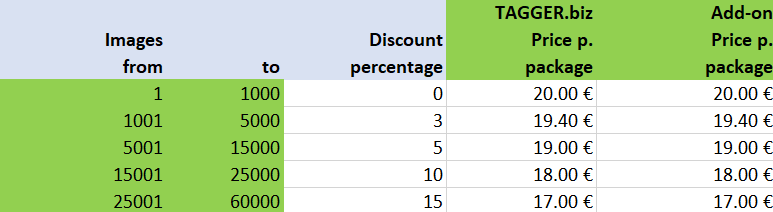
[CP_CALCULATED_FIELDS id=”6″]
The simplest way is: REMOTE TAGGING. You’ll share your image data with us, we will tag them according your wishes (e.g. images with 5 starts, labelled red)
With FULL TAGGING your original collection in Lightroom (or DarkTable or any other tool) will be tagged. You’ll get loadfiles to do that for you (exiftool needed).
You have to install some additional software on your computer: see description below.
It goes without saying that we’ll help you if you have any questions: support@tagger.biz
SIMPLE JPG TAGGING will only tag the JPG files you send to us: you don’t have to install any additional software on your computer: just send the files!
In SEND and RECEIVE you’ll find instructions how to install the software on your computer.
ORDER FULL TAGGING (REMOTE and with load files)
HERE
ORDER SIMPLE JPG TAGGING
HERE
Description
Before you order you have to decide how you want the keywording to be done.
There are 2 ways to do the tagging with the TAGGER.biz software:
1. You can simply give us your JPG files, we tag them and send them back.
2. You can use it as a service, most of the work is done at our place. This option is the best for personal use for photographers (support of RAW files)
1. simple JPG TAGGING
You upload your jpg images as an archive, we will send these jpg images back to you with all the keywords (tagged images)
Upload here
2. TAGGING as a service – JPG and RAW FILES
The tagging is done at TAGGER.biz.
We will create EXIF loadfiles for you with all the keywords per image.
A part of the tagging process has to be done by you. The main advantage is, that you can tag all images from your collection (e.g. in Lightroom) directly, it supports all RAW files.
The disadvantage is, that you need to install additional software (EXIFTOOL and a Python script):
You need to have a basic understanding of installing software on a PC or Mac. If you need help or have any questions: don’t hesitate to contact us on support@tagger.biz
In this workflow is visualized what is done at TAGGER.biz and what is done by you as our customer.
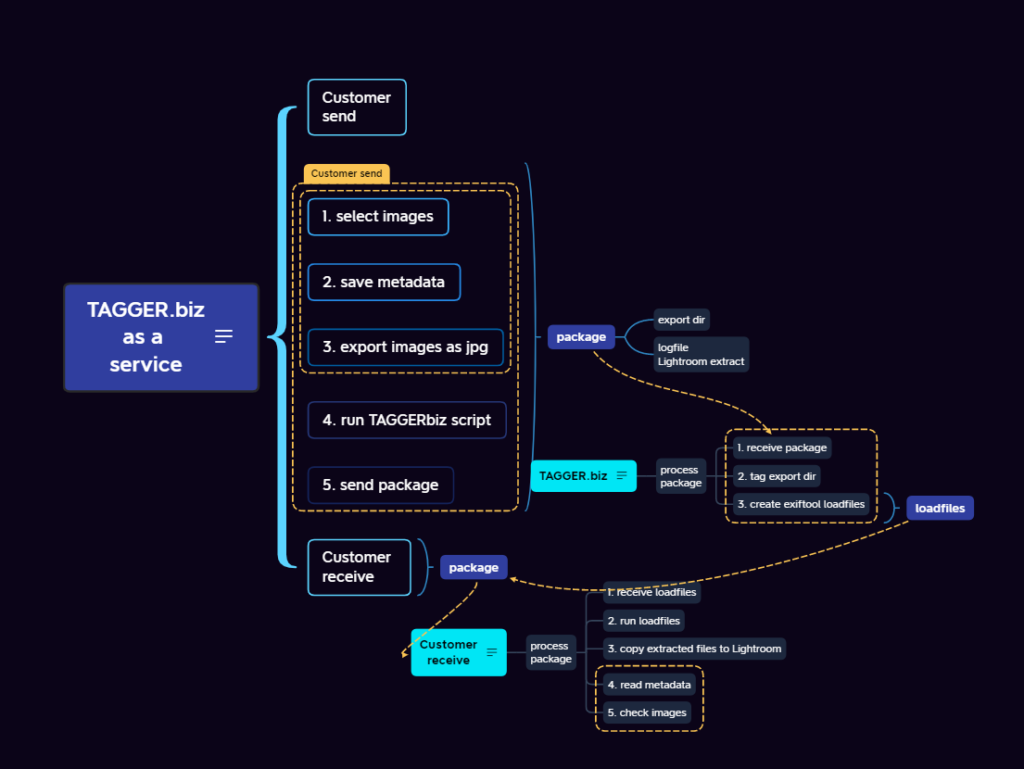
- You prepare a package for us, you send the data to us (exported jgp files and a content file of your original files), we will process it and send the exif loadfiles back to you.
You can start the loadfile at your workplace and the tagging will be done for you: on the ORIGINAL RAW files. There is a simple GUI to help you.
Example load file

- You have to install a Python package which helps you to prepare your delivery to TAGGER.biz.
You’ll get support with the configuration with a configuration gui. It will help you with the EXPORT to TAGGER.biz (the directories marked orange) and the IMPORT into Lightroom after you received your tagged files from TAGGER.biz back again.
Preparation for Tagging and
sending your Data to TAGGER.biz
click here
If you have any questions, please contact us: support@tagger.biz